INFORMATIVE
11 Ways on How to Humanize AI Content for Real Authenticity
Want AI content to feel human? Learn how to humanize AI content with simple tips that boost connection and audience trust.

Published Date:
Jun 5, 2025
Last Modified:
Jul 18, 2025

In an age when AI writes content, one thing is clear: readers can tell when something feels “robotic.”
Here are a few surprising stats:

This gap between efficiency and authenticity is a pain point for content creators. We all want the speed of AI without losing the human touch that makes content engaging.
While AI adoption among content creators is high, users also express concern about the authenticity and transparency of AI-generated content.
You might already be using AI writing tools to generate drafts in seconds, but raw AI text often lacks personality, emotional depth, and the unique tone that connects with readers.
The result? Stiff and cold AI content
This blog post will show you how to humanize AI-generated text so it feels authentic.
By the end, you’ll know how to make AI content sound more human in a few simple steps.
Let’s dive in!
What is AI-Generated Content?
AI-generated content is any text, image, video, or audio produced by an AI tool responding to a user prompt.
Instead of a human writing an article from scratch, AI models like GPT-4 generate content based on patterns in vast training data.
This technology has risen rapidly in blogging, marketing, and SEO workflows.
However, AI content comes with a big catch. It’s a bland remix of what’s already out there, as AI writes by predicting words,
That’s where “humanizing” comes in. It is the process of editing and enhancing AI text to give it personality, emotion, and credibility so it truly resonates with readers.
Want to know how AI text compares to human writing? Check out my other blog on AI vs. Human Content.
To ensure your AI-generated content truly connects with your audience, it’s crucial to understand the importance of search intent in SEO. Aligning your content with what users really want helps increase trust, engagement, and search rankings.
Why Humanizing AI Content Is Essential for Quality and Trust?
Using AI to write blog posts might seem cool until you realize something’s missing. AI-generated text often reads as too formal, repetitive, or soulless. Let’s understand why humanizing that content is so important:
AI can provide facts and mimic tone, but doesn’t genuinely feel the topic. Readers can tell that it won’t crack a smile, shed a tear, or get goosebumps. Humanizing adds the lived experiences, opinions, and feelings that give content its heartbeat.
AI-written articles are often criticized for being generic, repetitive, and dull. Readers will lose interest if your content sounds like a Wikipedia summary or uses overused phrases. Adding personality and variety helps make your writing more engaging and human.
AI can confidently generate false information, hurting your credibility if unchecked. Fact-checking and adding real data or anecdotes make your content more trustworthy and engaging. Readers connect more with content that shows a human touch.
Google’s helpful content guidelines prefer human-first content. From an SEO standpoint, quality and authenticity directly affect rankings. Google prioritizes original, people-first content. The Helpful Content system may penalize low-effort, generic text. Humanized content engages readers and meets Google's E-E-A-T standards, boosting your chances in search results.
Tone and connection make content resonate. That connection creates loyalty, which is the foundation for any successful blog, especially for those looking to make money from blogging.
In summary, humanizing AI content is essential if you want quality that readers trust. It’s the difference between an article that simply exists versus one that resonates. Now, let’s get practical and look at how to humanize AI content in your workflow.
How to Humanize AI Content (11 Actionable Tips)
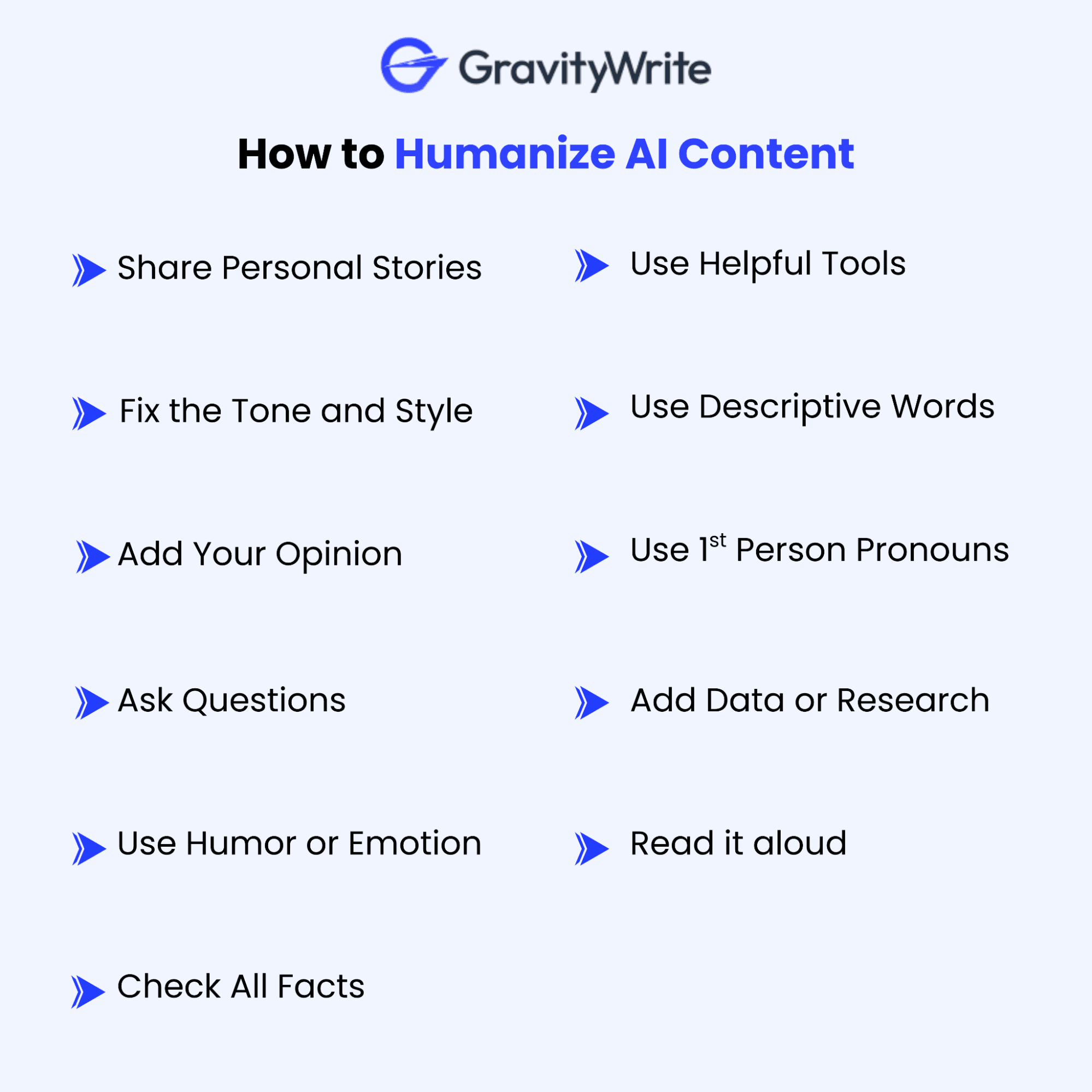
Real-World Workflow: From AI Draft to Humanized Post
How do you combine AI efficiency with human authenticity in practice? For going from an AI-generated draft to a polished, humanized blog post:
Want to know how to humanize AI content easily? Let’s walk through a real-world workflow using GravityWrite’s blogging tools.
1. Keyword Research
Use the Keyword Clustering tool to find long-tail keywords grouped by search intent. This helps with SEO optimization and aligns your content with user needs. A smart first step in your content strategy.
2. Generate Blog Topic Ideas
Try the Blog Topic Generator to generate catchy, relevant blog titles that match your keywords. This will help you hit the right tone early and understand how to humanize text from the beginning.
Want more inspiration for attention-grabbing titles? Check out our roundup of the best blog title generators to spark creativity that can help you brainstorm SEO-friendly, compelling titles in seconds.
3. Create a Blog Outline
Before you start writing, it’s worth checking our guide on how to use a blog outline generator effectively, which walks you through creating a well-structured, reader-friendly outline in minutes using AI.
Use the Blog Outline Tool to structure your content. It creates clean sections and bullet points, helping you improve grammar and sentence structure and ensure the flow is natural.
For a deeper look into tools that can make this step effortless, explore our guide to the best AI outline generators for blog planning that can help you organize ideas, structure your content, and set a strong foundation for natural, reader-focused writing
4. Write Full Blog Content with AI
Generate a complete post with the AI Blog Writer tool, including visuals and SEO-ready content. It’s one of the best apps to humanize AI text while saving time. Ideal for blogs in 25+ tones and 30+ languages.
Wanna stack up your arsenal? Consider exploring our roundup of the best AI blog generators for faster content creation to choose the right tool that aligns with your style, workflow, and content goals.
Knowing the differences between copywriting vs content writing can help you craft killer content that resonates with the audience.
One of the easiest ways to make your blog feel instantly engaging is to start with a powerful hook. If coming up with captivating openings isn’t your strong suit, our guide on how to use a hook generator walks you through creating attention-grabbing first lines that set the tone for the rest of your post.
5. Edit and Humanize
Use manual editing to add personal anecdotes, insert emotive language, and adjust tone to reflect your voice. This is how you add original thought and credibility, making AI-generated text more human.
To ensure your humanized content reaches its intended audience, don’t forget about technical SEO. Explore our actionable guide to essential meta tags for SEO optimization and learn how well-crafted titles, descriptions, and structure can maximize search rankings and traffic.
To maximize the reach of your humanized content, consider refining your meta descriptions with AI tools. Our guide on how to use meta description generator to boost your CTR walks you through creating engaging, SEO-friendly descriptions that attract more clicks and improve your search performance.
6. Final Review & Publish
Give your blog a final polish. Check for fact-checking, consistency, and emotional impact to reflect empathy in writing. Now you’re ready to publish a high-quality blog that feels authentic and performs well.
So, does it mean AI will replace human writers? No (at least not yet) Get more insights in this blog: Will AI replace writers?
Tools and Techniques That Help Humanize AI Content
While much of the process depends on your effort, some tools can support you. Consider them as assistants helping you refine tone, structure, and clarity. Here are a few worth adding to your content strategy:
1. Grammarly and Other Writing Assistants
Grammarly is more than a grammar checker—it also suggests tone improvements. It can help identify robotic or overly formal sentences and recommend more natural alternatives. ProWritingAid, Hemingway, and Quillbot offer similar support with clarity, conciseness, and grammar and sentence structure.
2. Hemingway Editor
The Hemingway App highlights hard-to-read sentences and overuse of passive voice. It helps simplify your writing and make it more human, beneficial if you tend to overwrite. A golden rule: human writers explain complex things simply—this tool keeps that in check.
3. AI Humanizer Tools
These tools are helpful for tricky sections, but they should be constantly reviewed to avoid changing meaning. We’ve reviewed some of the best AI content humanizer tools in a separate post.
Check out Generative Engine Optimization—it covers best practices for tuning prompts and models for better raw output quality.
4. Tone and Style Settings in AI Platforms
Some AI tools let you pick a tone (e.g., “friendly” or “witty”) or train the AI on your writing style. These settings reduce how much humanizing is needed later. While not perfect, tone presets can make your starting draft 20% closer to sounding human.
5. Content Optimization Tools
Platforms like Surfer SEO, Frase, and Clearscope help you balance readability with SEO. They suggest FAQs to include, terms to use, and content gaps to fill, without sounding robotic. These tools align your humanized content with SEO optimization goals.
6. Readability and Voice Checkers
Tools like Hemingway, Microsoft Word’s Readability Stats, Google Docs’ metrics, and sentiment analyzers can catch tone mismatches. Even AI detection tools like GPTZero can reverse check if your post still feels and needs more empathy in writing or personal anecdotes. Check my other post to avoid AI detection.
Final Tip: Combine Tools with a Human Process
For a thorough exploration of the differences between AI and human content creation—and how to balance both in your blogging strategy—read our comprehensive article on AI vs Human Content: The Role of AI in Content Creation. This guide offers practical examples and expert insights to help you craft authentic, engaging posts.
These tools help polish the mechanics, but only you can add the soul. Use them to support your voice, not replace it. A solid workflow might look like:
Draft with AI
Edit manually
Use Grammarly or Hemingway
Do a final read-aloud check.
This approach ensures that your content is both efficient and authentic. It is the key to making AI-generated text more human without losing your unique touch.
P.S. Want to grow your blog even further? Take a look at our guide to making money from blogging, where we explore how authentic content helps turn readers into loyal fans.
What to Avoid When Humanizing AI Content?
When learning how to humanize AI content, knowing what to avoid is just as important as knowing what to include. Here are key mistakes to steer clear of:
1. Don’t just copy-paste AI text without editing
This should go without saying. If you skip the humanization step, readers will notice—and so will search engines. Also, never assume an AI-generated “fact” is actual. Always verify. Relying blindly on AI might save time now, but it can cost you credibility later.
2. Avoid “fake” personality or irrelevant fluff
Adding personality is good, but only when it's authentic and relevant. Don’t force jokes or slang that clash with your audience or topic. For example, a meme reference in a serious finance article may feel out of place. And please, go easy on the emojis and exclamation marks (!). Keep it human—but valuable.
3. Don’t distort your brand voice
Humanizing doesn’t mean abandoning your identity. If your brand is technical or formal, you can still add human touches through clarity, personal anecdotes, or storytelling without sounding “trendy.” Stay true to your tone, just deliver it with warmth and intention.
4. Don’t try to sound “too perfect”
One telltale sign of AI writing is how overly polished or robotic it can feel. But humans make small mistakes—and that’s okay. Starting a sentence with “And” or using informal phrasing can add relatability. Don’t edit so much that your content loses its natural rhythm and voice.
5. Avoid repetitive language and sentence structure
AI often reuses phrasing and format. You might see repeated sentence openers like “Additionally” or overuse of the same adjectives. Be sure to vary your structure and check for unintentional repetition. It helps maintain readability and keeps the reader engaged.
6. Don’t ignore feedback or performance data
Pay attention to how your humanized content performs. More comments? Better time on page? Great. Not seeing results? Adjust. Maybe it needs more emotional depth—or maybe it's too casual. Feedback helps fine-tune your balance between automation and empathy in writing.
RELATED READS:
How to avoid AI detection in writing - 12 proven strategies that help your text read naturally and human-like.
AI vs Human Content - offers practical examples and expert insights to help you craft authentic, engaging posts.
Practical uses of AI in content marketing - breaks down key benefits, tools, and strategies to boost your marketing success.
💡 Final Thought: Find the Balance
Avoid extremes. Don’t post raw AI output—but don’t over-edit to the point it feels fake. The goal is to mix AI efficiency with human authenticity, keeping your reader’s experience in focus. That’s how you truly make AI-generated text more human.
To maximize the impact of your humanized content, it’s essential to post consistently. Our comprehensive guide on how often you should blog in 2025 explores the ideal posting frequency to balance quality and audience engagement, ensuring your blog stays fresh and competitive.
✨ Final Thoughts: The Human Touch Still Wins
AI can help you write faster, but real impact comes from the human touch. Your content needs more than facts and structure to connect with readers truly. It needs personality, emotion, and your unique voice.
Use AI to get started. Let it handle the rough ideas and layout. Then take the time to shape it. Add real stories, adjust the tone, check the facts, and ensure it sounds like you. These small steps turn average content into something people care about.
In a world full of robotic writing, human content stands out. It shows you care about your message and audience, which builds trust and keeps people coming back.
You don’t have to choose between speed and quality. You can have both. Let AI do the heavy lifting, then add your voice to make it shine.
To fully appreciate how to humanize AI content effectively, it’s crucial to understand both its advantages and limitations. Our in-depth article on the pros and cons of AI-generated content offers valuable insights into maximizing AI benefits while avoiding common pitfalls.
Once you’ve mastered the art of making AI content sound authentic, the next step is learning how to build and grow your own profitable blog. Our guide to launching and monetizing your blog walks you through everything from niche selection to income strategies.
Ready to write better, faster, and more human content? 👉 Get started with GravityWrite’s free plan and bring your words to life.
FAQs on Humanizing AI Content
1. What does it mean to humanize AI content?
It means editing AI-generated text to sound natural, personal, and engaging. You add human elements like tone, emotion, and storytelling. This removes the robotic feel and makes it more relatable. The goal is to create content that feels truly written by a person.
2. Why is it important to humanize AI content?
AI content often feels bland, generic, or untrustworthy to readers. Humanizing it builds connection, clarity, and credibility. It makes the content more valuable and enjoyable to read. Plus, it performs better with both people and search engines.
3. Can Google detect AI-generated content?
Google doesn’t punish AI content if it’s high-quality and helpful. But raw AI text can seem repetitive or shallow, which may hurt rankings. Humanizing improves clarity, tone, and structure, making content more likely to succeed in search.
4. How can I humanize AI content for free?
Use your editing—rewrite in your voice, add examples, and read it aloud. Free tools like Grammarly and Hemingway can support clarity and tone. You can also swap feedback with a peer. Thoughtful self-editing remains the most effective option.
5. What are some practical tips to make AI content sound more human?
Use a conversational tone, include real-life examples, and vary sentence flow. Add emotion, ask questions, and sprinkle in personal touches. Read your content aloud to spot awkward lines. Make sure it sounds like something you’d say.
6. Are there tools that help humanize AI content automatically?
Yes—tools like GravityWrite's AI Humanizer, QuillBot, and ChatGPT can rephrase text. They help smooth language and improve tone, but need review. These tools can speed things up, but aren’t perfect. Always give the final draft a human check.
7. Does humanizing AI content improve SEO?
Yes, it usually does. Humanized content is clearer, more engaging, and aligns with Google’s people-first focus. It can lead to longer time on page and more backlinks, all of which contribute to search rankings over time.
8. How do I maintain my brand voice when using AI-generated content?
Start by clearly defining your brand tone—fun, formal, bold, etc. Then edit AI content to reflect that voice through word choice and phrasing. Keep a style guide to stay consistent. A final pass by someone familiar with the brand helps.
9. Can AI content be completely undetectable?
If heavily edited, AI content can feel indistinguishable from human writing. That said, the goal should be quality, not deception. AI detectors aren’t perfect, and human-focused content usually passes them. Focus on being valuable, not invisible.
10. What are common mistakes to avoid when humanizing AI content?
Avoid overediting or leaving robotic phrases untouched. Don’t ignore tone, factual errors, or awkward structure. Avoid using tools blindly without review. Stay on-topic, align with your audience, and focus on clarity and usefulness throughout.


stay in the loop