





HOW-TO
How to Use AI to Write Blog Posts (Faster & Better in 2025)
Learn how to use AI to write blog posts and supercharge your blogging strategy. The result? Save time, improve content quality, and grow your audience faster.
Published Date:
May 16, 2025
Last Modified:
Jul 18, 2025
Staring at a blank page can feel overwhelming and time-consuming when writing a blog post from scratch.
If that sounds familiar, you’re not alone. Fortunately, AI is becoming a game-changer in content creation. In fact, bloggers who use AI have reported spending around 30% less time writing a blog post, giving you back precious time and energy to focus on what matters most.
This blog will walk you through how to use AI to write blog posts effectively, step by step, without sacrificing quality or originality.
By the end you'll learn:
When it makes sense to incorporate AI into your blog writing workflow.
How can this be done in a way that aligns with Google’s guidelines and SEO best practices?
How AI tools like GravityWrite’s AI SEO blog writer can become a valuable part of your content strategy, saving you time, helping you overcome writer’s block, and speeding up your workflow.
If you’re ready to start but aren’t sure which AI platform to choose, our guide to the best AI blog generators to streamline writing breaks down the top tools for creating engaging, SEO-friendly, and high-quality blog posts quickly.
Let’s go!
When is the Right Time to Use AI for Writing Your Blog Posts?
What is AI blog writing, and why is it becoming essential? AI blog writing refers to using artificial intelligence tools to help produce blog content. This approach is becoming essential in the blogging world because it addresses key pain points—saving time and reducing the mental load of content creation.
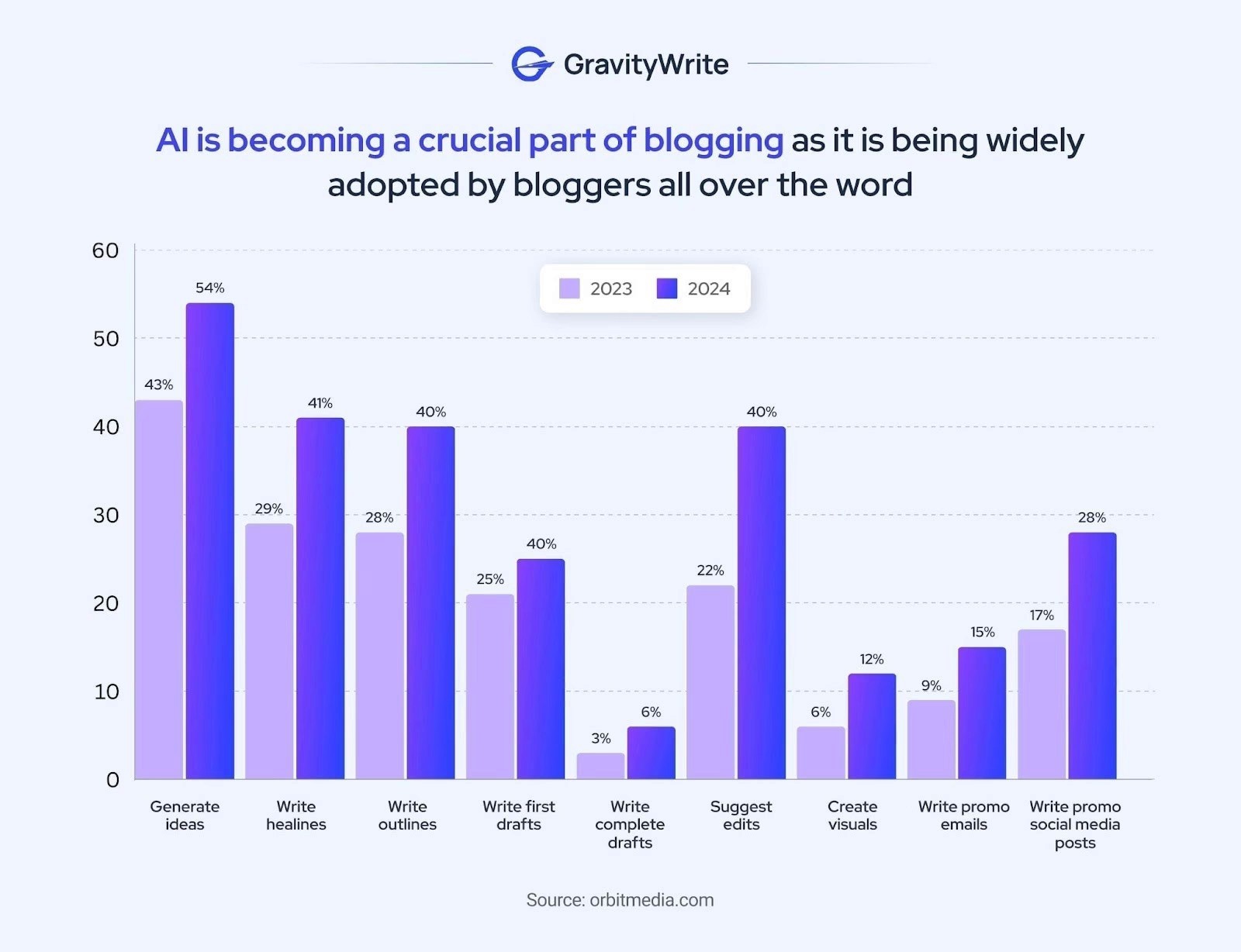
In fact, as per Ahrefs, 65% of bloggers use AI to generate ideas, write headlines, or outline articles. Specifically, 43% use AI for idea generation, 29% for writing headlines, and 28% for creating outlines, which shows how mainstream this practice is becoming.
So, when is the “right time” to start using AI in your blogging workflow? Consider using AI if you find yourself in any of these situations:
You have tight deadlines or a high volume of content to produce. Writing multiple articles per week can be daunting. AI can quickly generate first drafts or content ideas, allowing you to scale up your output.
You’re stuck in the brainstorming phase. Perhaps you’re struggling to come up with fresh topics or angles. AI tools can help brainstorm blog post ideas in seconds, sparking creativity when you’re running dry.
When writing feels exhausting or too time-consuming, it leaves you burned out. AI writing assistants excel at generating coherent text fast.. If writing blog posts from scratch feels like a task, letting an AI handle the initial draft can be a game-changer.
You want to improve your blog writing workflow. Integrating an AI tool into your process can streamline repetitive tasks. Over time, this blog writing workflow enhancement enables you to concentrate on strategy and creativity.
Remember that AI doesn’t mean replacing your own voice or expertise. Think of the AI as a writing partner or assistant. You’re still the boss, guiding the AI with inputs and editing the output to ensure the final article meets your quality standards.
Google’s Guidelines About Using AI for Blog Writing
One of the biggest questions bloggers have is: “What does Google think about AI-written content? Will my site be penalized if I use AI for blog posts?” The answer is YES and NO. Let me explain!
In early 2023, Google made it clear that “We reward high-quality content, however it is produced, as long as it’s helpful and demonstrates E-E-A-T.”
If you want to ensure your AI-generated content still reads naturally and meets high standards, here’s a helpful guide on humanizing AI content that complements AI efficiency with a human touch.
Here is a breakdown of Google's stance on AI content:
Focus on helpful, original content: Whether the content is AI-generated or human-written, it should provide value to readers. Avoid pumping out dozens of low-quality, generic posts via AI just to churn out content. Google’s algorithms (and readers!) will see through that. Instead, use AI to assist in creating helpful, well-researched articles that answer real questions or solve problems for your audience.
Maintain E-E-A-T in your content: AI has no “experience” or true expertise of its own – it relies on patterns from training data. So it’s up to you to inject experience and expertise. Share personal insights, examples, or case studies that an AI wouldn’t know. Cite credible sources to back up facts. This builds authority and trustworthiness. By editing and adding to AI output, you ensure the content meets the E-E-A-T standards Google looks for.
Avoid spammy AI practices: Google still prohibits content generated solely to manipulate search rankings without regard for quality—this falls under spam. For instance, auto-generating a hundred.
The takeaway? Use AI as a tool, not a cheat. Just like any innovation, there are pros and cons of AI-generated content. So, always review and polish AI-written text so it offers genuine value and reads naturally. By adhering to best practices (like maintaining originality, depth, and accuracy), you can enjoy AI's efficiency and also make Google reward you.
Step-by-Step: Use AI to Write Blog Posts Efficiently
Other Blogging Tools to Simplify Blogging
In the earlier section, we saw how GravityWrite can simplify anyone's blogging workflow. Now, let us look at other tools that you can rely upon.
Choosing the best AI for writing blog posts depends on your goals. Whether you want to create a blog post with AI or need the best blog writing assistant for SEO, these tools are essential.
Here’s an overview of some top AI blog writing tools available:
Writesonic helps me brainstorm content ideas, outlines, and full articles in no time. It keeps my tone and style consistent, and it’s my go-to for crafting catchy headlines and social media captions to promote each post.
Surfer SEO gives me real-time SEO recommendations based on top-ranking pages. It guides me on word count, keyword density, and structure so my content stays optimized and ranks well, without sacrificing readability.
Contentshake AI either optimizes my existing content or builds a new article from scratch. It even analyzes my competitors to recommend ideal word counts, titles, keywords, structure, and meta content. Plus, it helps push the finished blog to social platforms to get the attention it deserves.
Frase uses AI to generate content briefs and optimize existing articles by analyzing the top-ranking pages for a given keyword. It identifies key topics to include and offers suggestions for improvement based on competitor content. Its ability to automate research and outline creation saves bloggers hours. Frase is excellent for content marketers aiming for top search rankings.
MarketMuse uses AI to audit your content and recommend enhancements based on semantic keyword relevance. It helps bloggers create comprehensive content that ranks well by filling in topical gaps. The tool provides a content score compared to top-ranking articles. It’s especially useful for long-term SEO and content authority building.
With these tools in my arsenal, blogging has become faster, easier, and way more effective.
Each of these tools has its own strengths. Some excel at writing, others shine in SEO optimization, and one-click blog generation.
When choosing an AI blog writing tool, consider factors like output quality, ease of use, customization, SEO features, and, of course, cost. Most offer free trials or free tiers, so you can experiment to see which fits your style.
For a deeper comparison of the best blog writing tools, check out our detailed roundup of the Top AI blog writing tools.
Essential Tips to Ensure Content Quality
Using AI can drastically speed up the writing process, but quality is the priority. Here are some essential tips to make sure your AI-assisted blog post is top-notch and reader-friendly:
Improve Readability – Use short paragraphs, subheadings, bullet points, and visuals to make content easy to scan. The bottom line is, even if AI helped write the content, you should present it in a clean, reader-friendly way.
Share Actionable Takeaways – Provide practical tips, examples, or strategies that readers can immediately apply. When readers feel they’ve learned something they can act on, they’re more likely to trust your content and return for more. AI might give a lot of general text, but it’s up to you to refine it into clear, action-oriented advice.
Build Credibility with Proof – Support claims with data, expert quotes, case studies, or reliable sources. These signals show readers (and Google’s algorithm) that your content is well-researched and trustworthy.
Optimize for SEO – To make sure your AI-generated content performs well on search engines, follow these simple SEO tips:
Use Long-Tail Keywords: Target specific, longer phrases like “best Ayurvedic skincare products for dry skin” instead of short, broad keywords. Long-tail keywords often have less competition and better align with the searcher’s intent.
Add Alt Text to Images: Include descriptive alt text for every image. This not only helps with accessibility but also improves SEO. Alt text allows search engines to understand the content of your images, potentially boosting your visibility in image searches.
Keep Paragraphs Short: Break your content into short, clear paragraphs to make it easier to read. Good readability improves user experience, which is a factor in SEO rankings.
Want more tips on how to write SEO-optimized content? Check out SEO Content Writing Tips.
Connect with Your Audience – Encourage comments, ask questions, and use a relatable tone to engage readers. Make sure your tone throughout the article is relatable and conversational enough that readers feel a human connection. Even if an AI helped generate the words, you are the one connecting with readers through them. A blog that feels like a two-way conversation will always stand out, AI or not.
Once your draft is polished, don’t overlook your conclusion—it’s your final chance to leave an impact. Looking for guidance? See the best way to write a blog conclusion to wrap up your post with clarity and persuasion.
Benefits of Using AI for Blog Posts
The benefits of using AI for blog writing go beyond speed. Whether you’re managing multiple websites or building a personal brand, AI blog posts can help. Here is what you’ll get by using AI:
Speed and Efficiency: AI can dramatically accelerate content creation. Tasks that normally take hours can be done in a fraction of the time with AI help.
Creativity Boost and Idea Generation: AI can generate ideas that you might not have come up with on your own.
Consistency and Structure: If you struggle with organizing your thoughts or maintaining a logical flow, AI can help create a structure through outlines and section suggestions.
Overcoming Repetitive Tasks: AI tools can handle a lot of tasks quickly, unlike humans. By letting AI handle the groundwork, you save mental energy for the more nuanced parts of writing that truly require your attention.
Increased Productivity and Scalability: With tools like GravityWrite’s blog writer, you can scale your content strategy efficiently and meet high-volume demands.
Cost Savings: AI helps lower content production costs significantly by reducing the need for large writing teams or outsourcing.
Consistent Tone and Quality: AI tools can maintain your brand voice across all posts, ensuring a uniform tone and professional quality.
Real-Time Research and Data: A few AI tools can pull the latest facts, trends, and data from the web, helping you create up-to-date and informative content.
Multimedia Support: AI can generate images and infographics or even embed relevant visuals directly into the content, enhancing engagement.
Monetization opportunities: Once your content workflow is running efficiently, it opens the door to monetization. Learn more about turning your blog into a source of income in this guide on how to make money blogging.
In summary, using AI for blog writing can lead to faster production, more ideas, well-structured and consistent posts, and relief from tedious writing tasks, all while maintaining originality when managed properly.
Cost-Effectiveness Analysis of AI Blog Writing
Beyond qualitative benefits, let’s talk about something more concrete: cost and time savings. Adopting AI in your blog writing workflow can be extremely cost-effective, especially if you’re producing content at scale or on a tight budget. Here’s a breakdown of why:
Reduced Content Creation Costs: Businesses and individuals who produce a lot of content often spend significant money either hiring writers or spending time. AI can cut these dramatically. Even if you’re a solo blogger, time is money.
Time is Money: Creating a high-quality blog post manually can take up to 10 hours. With AI, that time can drop to around 1.5 hours.
Here's how:
Task | Manual Time ⏱️ | With AI 🎰 |
Research | ~3 hours (reading, note-taking, sourcing) | ~12 minutes (summaries, quick prompts) |
Drafting | ~4–5 hours (writing from scratch) | ~45–60 minutes (guiding AI, compiling sections) |
Editing | ~2 hours (proofreading and polishing) | ~30–60 minutes (cleaner draft from AI) |
Total | ~10 hours | ~1.5 hours |
✅ Time Saved: Up to 85%.
✅ Impact: Enables creating multiple posts per day instead of one, increasing output, efficiency, and reach.
Better Use of Time and Talent: AI speeds up routine writing tasks, which means more time to engage with their audience, improve their product, or learn new skills that grow their business.
Lower Barrier to Entry: AI tools make it possible to create quality content without a large team or budget, allowing small businesses and new bloggers to compete with bigger players.
Of course, AI tools themselves have a cost (monthly subscriptions, etc.), but as noted, those typically pale in comparison to human labor costs for the equivalent output. The key is to use the tools to genuinely save time and/or money, and then reinvest those savings into areas that further grow your blog or business.
Common Mistakes to Avoid When Using AI for Blogs
While AI can be a boon for content creation, there are also blogging mistakes to avoid. To ensure your AI-assisted blog posts truly shine, avoid these common mistakes when using AI in your writing process:
Overreliance on AI without human editing: If you start trusting the AI’s output blindly and hit publish without thorough review, you risk ending up with subpar or error-filled content. Make it a rule to never publish AI text unedited.
Ignoring SEO best practices: While AI can insert some keywords if you prompt it to, it doesn’t inherently know your SEO strategy or target keywords unless you guide it. Don’t skip the SEO process—optimize blog posts for SEO to ensure your AI draft is search-engine ready. Use AI to accelerate it (e.g., to cluster keywords or generate meta description ideas), but always apply your SEO knowledge to the final content.
To further understand why some queries never result in clicks—and how to prepare for them—see Zero Click Search.Producing generic or repetitive content: AI, especially when prompted similarly, can produce content that starts to sound formulaic or generic. To combat this, always personalize and customize the AI’s output.
Avoiding these mistakes comes down to a simple principle: AI can expedite tasks, but you must guide it at every step to get truly high-quality results. With that mindset, you can confidently use AI without compromising on quality or effectiveness.
Use AI to Write Blog Posts—Start Today
With the right tools, you can use AI to write blog posts that are consistent with your brand voice—and if you’re looking to scale your content efficiently, this step is absolutely vital.
So, blogging doesn’t have to be a long, exhausting process anymore. Instead of staring at a blank page, you can focus on your creativity while AI handles the structure, flow, and even the visuals.
It’s not about replacing human touch—it’s about enhancing it. You’re still in control, guiding the voice and direction, while AI speeds things up and helps you create content that connects with your readers.
If you're wondering where to start, GravityWrite’s AI Blog Writer is a game-changer. It creates SEO-optimized, human-like blog posts of over 5,000 words—complete with AI-generated visuals—all from just your topic and tone. It supports 30+ languages, 25+ tones, and is perfect for beginners, businesses, and bloggers who want to scale content without breaking the bank.
For teams aiming to systematically increase volume and maintain quality, check out our post on Content scaling — it’s packed with 10 proven strategies for sustainable content growth.
Still unsure?
Try Gravitywrite's free plan that lets you generate up to 1,000 words—no payment details needed. It’s a smart way to test the tool and see how easily your blog can come to life.
Give it a go—you might be amazed at how much time and energy you save!
FAQs About Using AI to Write Blog Posts
1. What are the benefits of using AI for blog writing?
AI can save you time and effort by quickly generating well-structured, SEO-friendly blog posts. It helps with idea generation, research, and content drafting, making blogging faster and more consistent. AI tools can also assist with language translation, tone adjustment, and keyword optimization, helping you scale your content easily.
2. What are the disadvantages of AI content?
AI-written content can sometimes lack depth, personal voice, or originality. If not reviewed, it may contain factual errors or sound too generic. It also might not fully capture brand personality unless guided by clear inputs. That’s why human editing and creativity are still essential.
3. Can Google detect AI blog posts?
Yes, Google’s algorithms are becoming better at identifying AI-generated content, especially if it’s low-quality or spammy. However, Google doesn't penalize content just for being AI-written. It focuses on quality, relevance, and user value.
4. Does AI-written content rank on Google?
Yes, AI content can rank on Google if it’s helpful, original, and optimized for search. As long as your content provides value to readers, follows SEO best practices, and meets Google’s E-E-A-T (Experience, Expertise, Authoritativeness, Trustworthiness) guidelines, it has ranking potential—even if AI-assisted.


stay in the loop