LISTINGS
10 Best AI Art Generators in 2025 [Tested and Reviewed]
Check out the 10 best AI art generators of 2025. We test each tool, compare features, and help you choose the right one for your needs!

Published Date:
Nov 5, 2024
Last Modified:
May 30, 2025

Not long ago, creating artwork meant pulling out pencils, paints, or learning your way around complex design software.
If you needed something original - like a logo, a book cover, or a quick concept sketch — you either had to do it yourself or pay someone else to do it for you.
Then came digital design tools like Photoshop and Illustrator. They opened new doors, but they weren’t easy to learn unless you had time, training, or a graphic design background.
Now things are different.
All you have to do is type out a simple sentence, and within seconds, an AI turns your idea into an image.
After tools like ChatGPT proved that machines could write, visual tools weren’t far behind. Today, the best AI art generators are being used across industries. Businesses, creators, marketers, educators, and everyday users are turning quick ideas into real visuals — no art skills needed.
Whether you want to mock up product packaging, illustrate a blog, bring a story to life, or just play around with creative ideas, AI can help you do it faster and more freely than ever.
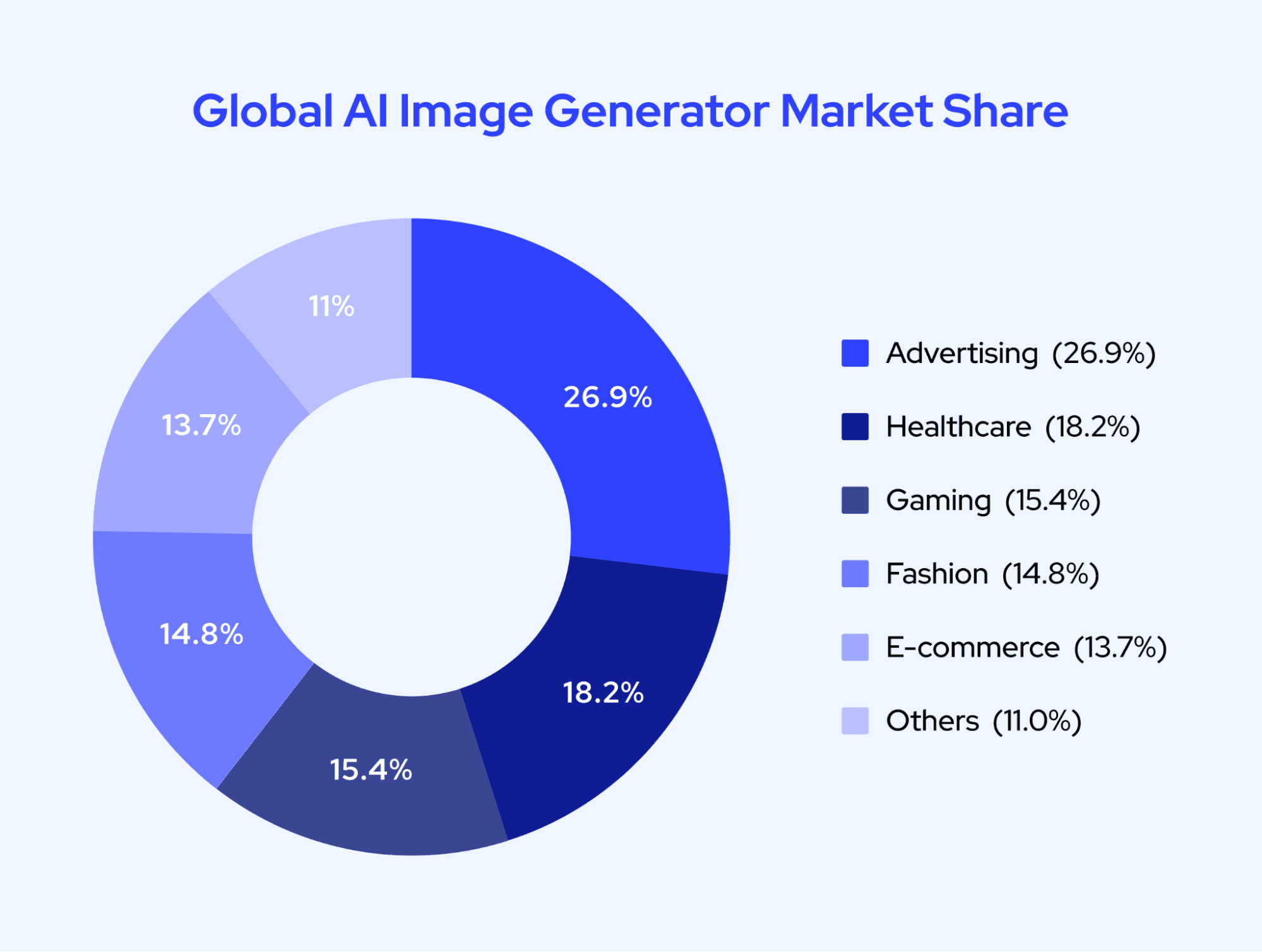
[Source: Fortune Business Insights]
🎨 Curious Which AI Art Generator Fits You Best? Compare the Top Choices of 2025!
This blog will cover the 10 best AI art generators I’ve tested, so you can find the perfect tool for your creative work.
What are AI Art Generators?
An AI art generator is a tool that turns your words into pictures.
You describe what you want to see — like:
“A cozy cabin in the woods, drawn in pencil sketch style”
And the tool creates an image based on your description.
These tools don’t grab images from the internet or search a database. They build new images from scratch, using artificial intelligence trained on millions of visual examples and text descriptions.
This means the images you get are original - shaped by what you wrote, not copied from somewhere else.
You don’t need any design experience to use one. Just a prompt. It can be simple or detailed. The AI takes it from there.
How Do AI Art Generators Work?
Here’s how it works, in simple steps:
It starts with noise. Like static on a screen - just random pixels.
It reads your prompt. The AI looks at your description and starts figuring out what you want to see.
It begins shaping the image. Step by step, it clears away the noise and replaces it with structure - outlines, lighting, texture, color.
You get your result. In a few seconds, the final image appears.
This process is called diffusion. You don’t need to remember that - what matters is this: the AI has already seen millions of images and learned how to combine shapes, styles, and ideas. So when you give it a prompt like:
“A pink garden gnome sitting in a teacup by a sunny window”
It knows what a gnome usually looks like. It understands teacup shapes, how sunlight hits objects, and what “pink” means in different scenes. Then it builds a fresh image using all of that knowledge.
Some AI tools work better with short, simple prompts. Others let you get very specific with lighting, style, mood, and perspective. But in both cases, you’re not guessing - you’re guiding.
The result is something you can save, share, edit, or build on - without opening a single design program.
10 Best AI Art Generators - A Quick Glance
Let's look at the top 10 AI art generators we've tested and reviewed. Each tool offers unique features at different pricing plans, which helps you to find the perfect match for your creative needs:
| S. No | Tool | Free Plan | Starting Price | Best For | Notable Features |
|---|---|---|---|---|---|
| 1 | GravityWrite | Yes | Plus plan ($8/mo for a 12-month term); Pro plan ($49/mo for a 12-month term) | Fast, template-based image creation | 80+ art styles, prompt presets, HD output, Remix mode |
| 2 | MidJourney | No (trials occasionally open) | $10/month | High-quality artistic visuals | Text weights, image variations, community gallery |
| 3 | Leonardo AI | Yes | $9/month | Beginner-friendly image creation | Background removal, inpainting, animation tools |
| 4 | Canva | Yes | $15/month | Book covers, social media designs | Drag-and-drop editor, print-ready exports, mobile-friendly |
| 5 | Stable Diffusion | Yes (limited) | $10/month | Full control and customization | Supports 10,000-character prompts, reference images |
| 6 | Adobe Express | Yes | $9.99/month | Quick logos and business branding | Two-stage logo builder, style presets, mobile access |
| 7 | DALL·E 3 | No (via ChatGPT Plus) | $0.04/image | Easy commercial use via ChatGPT | HD formats, flexible aspect ratios, ChatGPT integration |
| 8 | NightCafe | Yes | $5.99/month | Anime and niche art styles | Anime models, style presets, community features |
| 9 | DeepAI | Yes | $4.99/month | Fantasy characters and quick drafts | Simple interface, commercial licensing, fast output |
| 10 | OpenArt | Yes | $14/month | Bulk creation for merch and t-shirts | 3D mockups, QR code integration, batch generation |
10 Best AI Art Generator in 2025 (Free and Paid)
We've tested the most popular AI art tools to help you find the best one for your creative needs. Here is our handpicked list of 10 best AI art generator in 2025.
Best AI Art Generator Online - GravityWrite
Best AI Art Generator from Text - MidJourney
Best AI Image Generator for Beginners - Leonardo AI
Best AI Tool for Book Covers - Canva
Best AI Art Generator for Children's Books - Stable Diffusion
Best AI Logo Generator - Adobe Express
Best AI image Generator for Commercial Use - Dall-E
Best AI Anime Character Generator - NightCafe
Best AI Tool for Fantasy Characters - DeepAI
Best AI Generator for T-shirt Design - OpenArt
Now, let's explore each of these tools in detail…
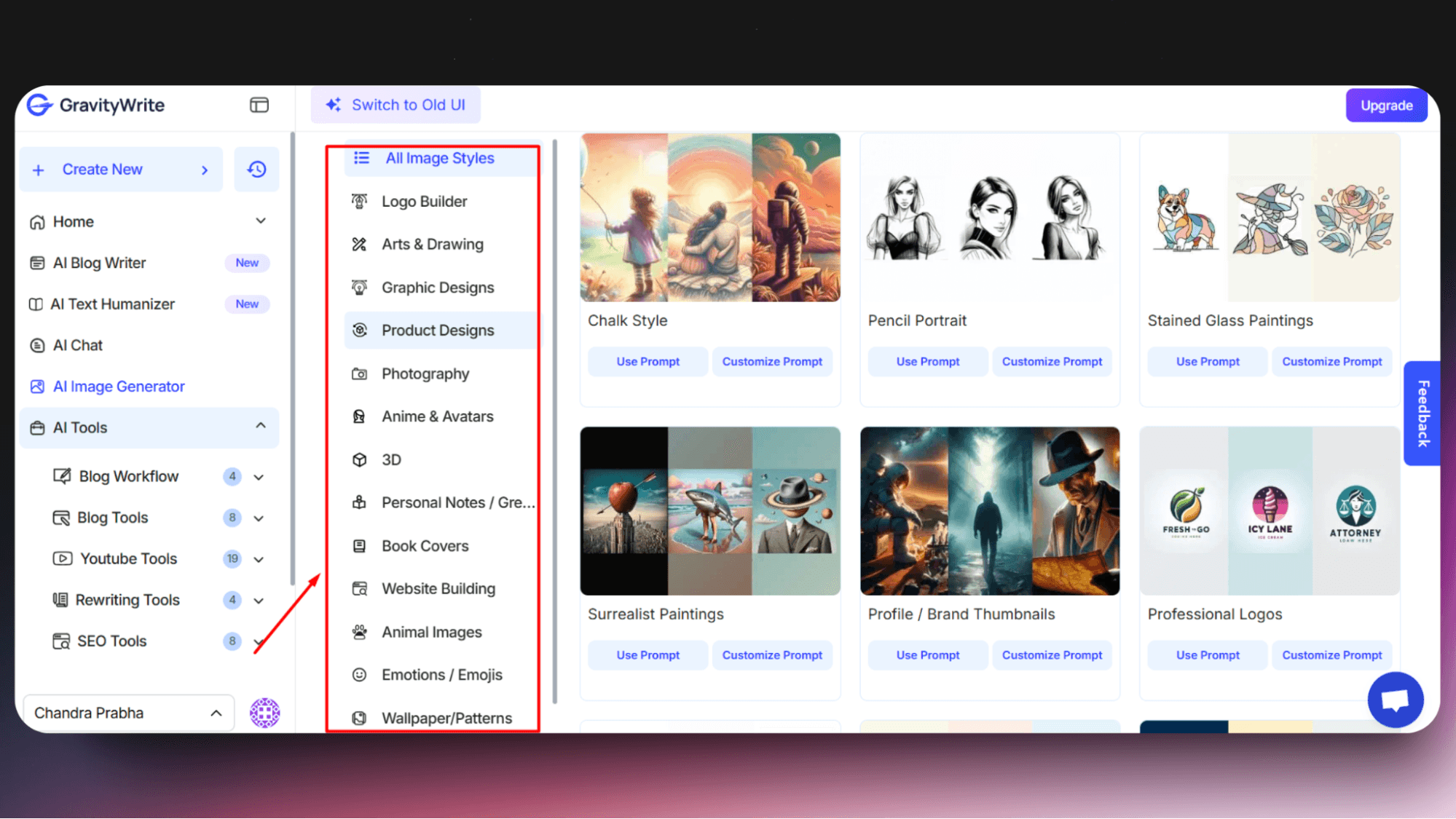
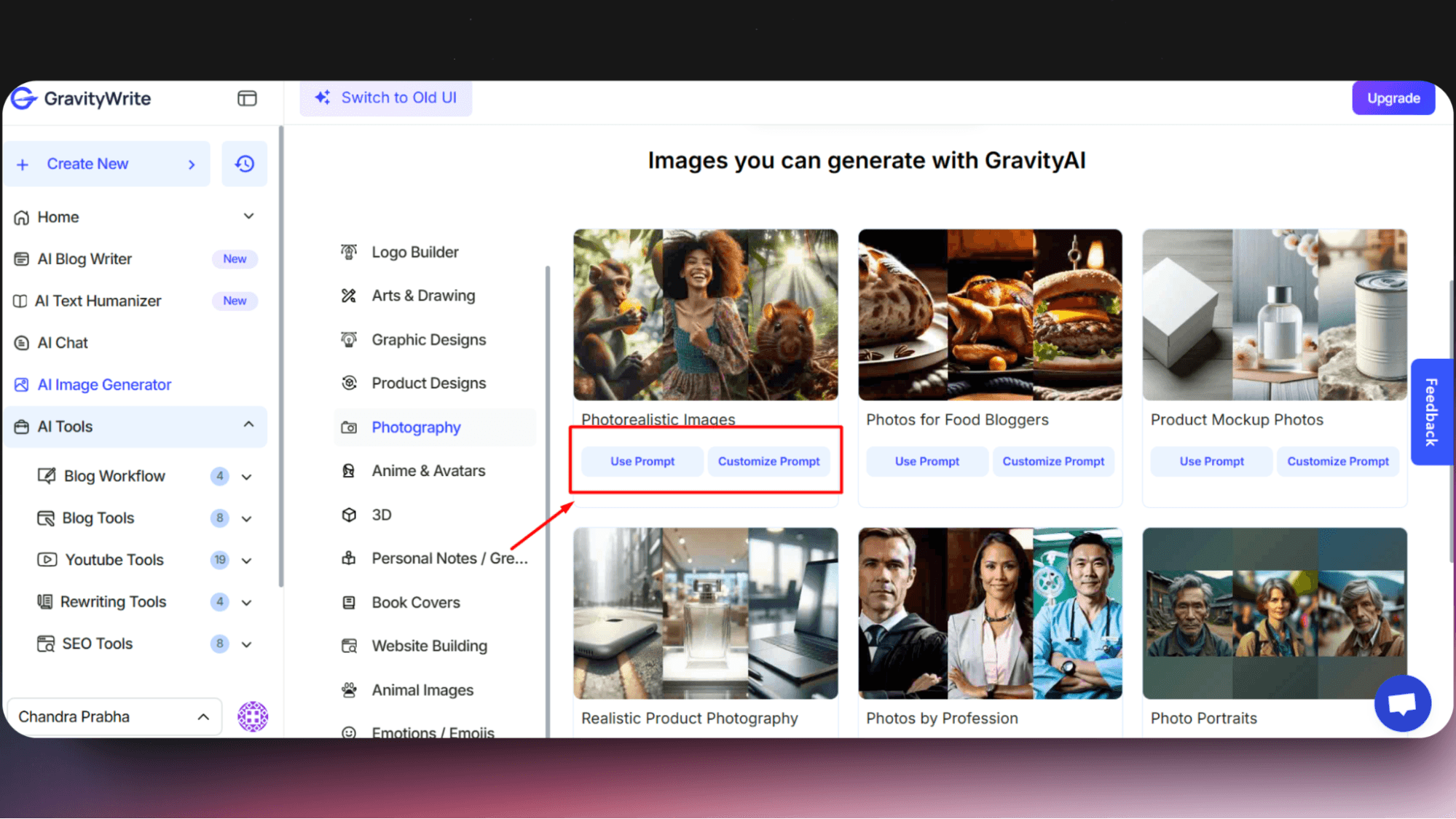
1. GravityWrite - The Best AI Art Generator Online


2. MidJourney - The Best AI Art Generator from Text

Challenges of Using an AI Art Generator
While AI art tools are amazing, they do come with some important concerns that users should know about.
One big issue is about who owns the artwork. Currently, in the U.S., AI-created art can't be copyrighted because it's not made by humans. This means you need to think carefully about how you'll use these images, especially for business.
There's also an ongoing debate about fairness to artists. These AI tools learn by studying millions of artworks online, often without the original artists' permission. Many artists are concerned about how their work is being used to train these systems.
Another challenge is writing effective prompts (commands) for the AI. Think of it like giving instructions to an artist. If you say, "Make a cat picture," you could get any type of cat in any style.
But if you say, "Create a friendly orange cat sitting in a sunny window with a blue curtain," the AI better understands what you want. Even then, you might need to try a few times to get it just right.
Another tricky part is the AI's limitations. Sometimes, it might:
Create images with unintended biases
Produce artwork that looks similar to existing pieces
Make content that might accidentally offend people
Not understand complex artistic details exactly as you want
Before using AI art generators, it's important to understand these challenges. This helps you use the tools responsibly while respecting the creative community.
3. Leonardo AI - The Best AI Art Generator for Beginners

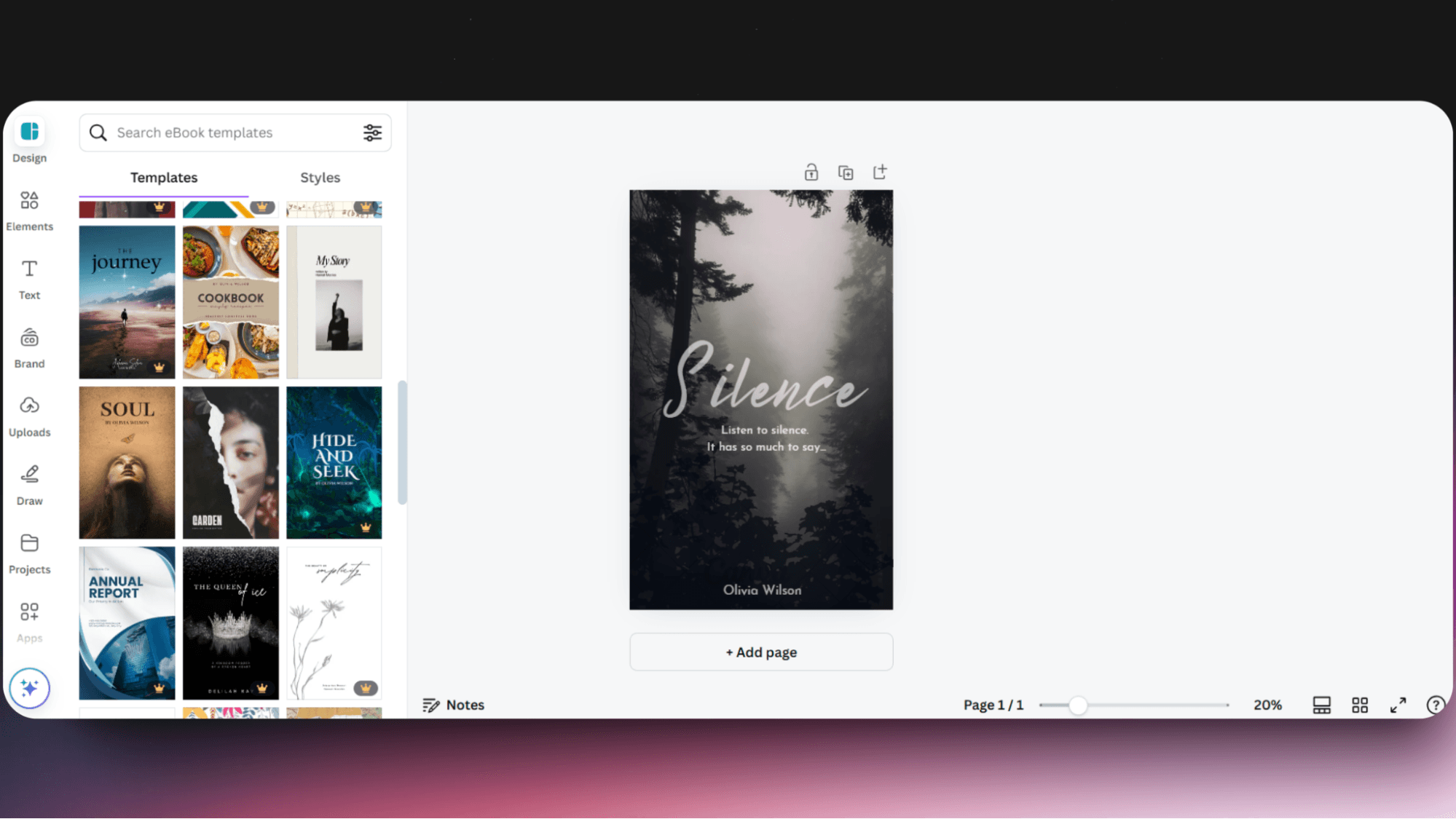
4. Canva - The Best AI Art Generator for Book Covers
5. Stable Diffusion - The Best AI Art Generator for Children's Books

6. Adobe Express - The Best AI Art Generator for Logos

7. Dall-E - The Best AI Art Generator for Commercial Use

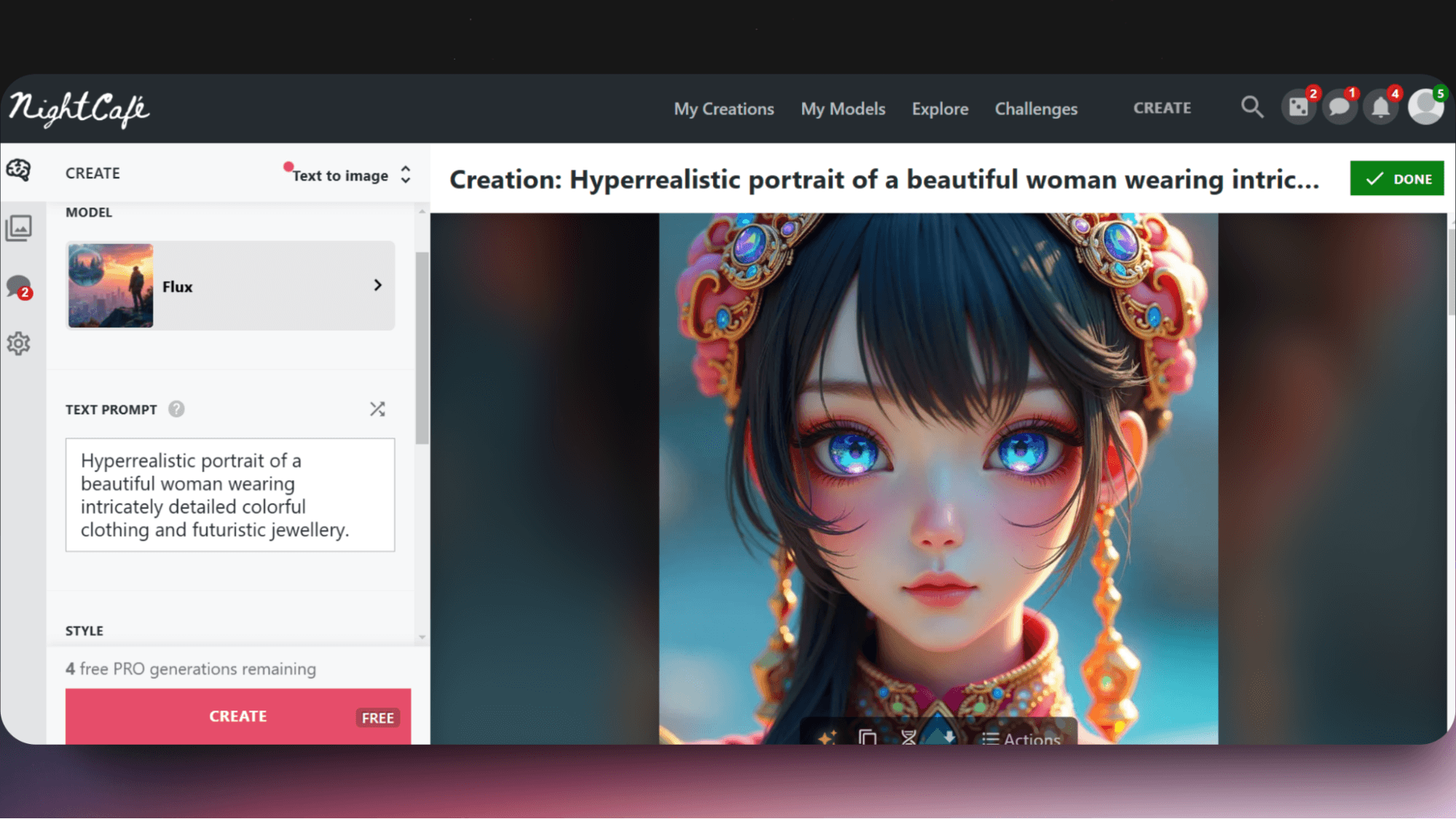
8. NightCafe - The Best AI Art Generator for Anime Characters
9. DeepAI - The Best AI Art Generator for Fantasy Characters

10. OpenArt - The Best AI Art Generator for T-shirt Design

Benefits of Using AI Art Generators for Creatives and Designers
AI art generators have changed how we create designs, making it easier for everyone - from small business owners to freelance designers. Now, let's explore what makes AI image generators valuable tools for creative work.
Time and Cost Benefits
You might be surprised how much time and money AI art tools can save you. Instead of spending hours creating a single design or paying for expensive software, you can now create professional artwork in minutes.
For example, if you want to create a fantasy landscape, simply describe what you're imagining - "a magical forest with glowing mushrooms under a starlit sky" - and the AI will create it instantly. This same piece might take days to create traditionally.
Simple Creation Process
One of the best things about AI art generators is how easy they are to use. You don't need to learn complex tools or techniques. Just type what you want to create, and the AI understands and delivers. If you're not happy with the result, you can easily adjust your description and try again.
Consider how you can turn a simple idea into multiple versions. Want to see it in different styles? Just ask the AI to make it "dreamy," "realistic," or "cartoon-style" - it's that simple.
Creative Exploration
AI tools give you the freedom to experiment without limitations. You can try different ideas quickly, and there's no pressure about making mistakes. This means you can focus on being creative rather than worrying about technical skills.
Here's what you need to know about the creative benefits:
Generate multiple design options instantly
Try different artistic styles effortlessly
Make quick adjustments and refinements
Learn what works through easy experimentation
Save successful designs for future reference
Build on existing ideas easily
Develop your creative vision without technical barriers
Remember, while these tools are powerful, they work best when guided by your creative vision. Take time to experiment with different descriptions and styles to discover what works best for your needs.
How to Choose the Best AI Art Generator?
Finding the right AI art generator can make a big difference in your work. Let's look at what you need to consider before picking one.
Speed
Speed really matters when you're creating AI art. If you need to wait minutes for each image, it can slow down your whole process. The best tools should create images in seconds, letting you try different ideas quickly.
This becomes especially important when you're working on a project that needs multiple versions. Imagine waiting 5 minutes for each try - it could take hours to get the perfect image. Good AI tools should keep up with your creative flow.
Accuracy
How well does the AI understand what you want? This is probably the most important thing to check. A good AI tool should create exactly what you describe in your prompt. If you ask for "a red lighthouse by the ocean at sunset," that's exactly what you should get.
If you find yourself constantly struggling to get the right results, or if the AI keeps missing important details from your prompts, it might not be the right tool for you.
Prompt Responsiveness
The AI should understand different types of prompts. Some people prefer simple descriptions, while others like to be very specific.
Whether you write "sunny beach" or "peaceful Mediterranean beach with white sand and crystal-clear turquoise water at golden hour," the tool should handle both well. Good AI tools adapt to your way of describing things.
Read this blog to discover which tool is the best AI image prompt generator!
Budget
Most AI art tools offer both free and paid options. Free versions usually let you create a few images each day, which can be perfect for trying out the tool or occasional use.
Paid versions give you more features and no limits. But before spending money, try the free versions first. This helps you understand which tool matches your style and needs.
Other Features
Look for AI tools that offer basic editing options. You might want to adjust colors, and brightness, or remove backgrounds from your created images. These small adjustments can make a big difference in your final result.
Some tools also provide different art styles and quality settings. This lets you create everything from simple sketches to highly detailed artwork. Having these options gives you more creative freedom.
File formats and download options are also important. Good tools let you save your work in various sizes and formats, making it easier to use your creations in different projects.
Remember, the right tool for you depends on how you plan to use it. Take time to test different options before deciding. This helps you find one that really fits your creative process.
For a wider range of AI-powered visual creation tools beyond art, explore our comprehensive list of the best AI image generators for all creative needs to find the perfect platform that suits your project goals and style preferences.
Final thoughts: AI Art Isn’t the Future - It’s Already Here
Creating art used to require skill, time, or expensive tools. Now? You just need an idea and a few words.
From book covers to branding, concept art to social media posts, the best AI art generators make it possible to go from blank screen to finished visual in seconds - no design background needed.
And if you're looking for a tool that’s fast, easy to use, and packed with variety - GravityWrite is one of the most versatile places to start.
It doesn’t just give you one image generator - it gives you 80+ styles, smart templates, HD quality, and powerful settings to fine-tune your results. Whether you need logos, product mockups, illustrations, or even photorealistic scenes, GravityWrite helps you build them all - with zero friction.
🎨 Ready to try it? Get started with GravityWrite’s free plan and explore how easy and fun creating with AI can be.
No pressure. Just possibilities!
FAQs on Best AI Art Generator
Are AI-generated images copyrighted?
Each platform has different rules. Some give you full rights to use the images you create, while others might place them in the public domain. Check your chosen platform's terms before using images commercially.
What are the risks of AI art?
The biggest risk is accidentally creating something that looks too similar to existing artwork(copyright infringement). Also, AI art quality can be unpredictable - you might need several tries to get exactly what you want.
Is it OK to copy someone's art style?
While AI can be inspired by different styles, directly copying an artist's unique style may raise ethical concerns. It's best to use AI tools to develop your own creative direction.
Can AI steal my artwork?
AI models learn from publicly available images but don't "steal" artwork. However, they might create similar-looking pieces based on their training data.
Are there ethical implications with AI image generators?
Yes, AI image generation raises questions about artist attribution and fair compensation. It's important to use these tools responsibly and respect original artists' work.


stay in the loop